> ## Documentation Index
> Fetch the complete documentation index at: https://polos.dev/docs/llms.txt
> Use this file to discover all available pages before exploring further.
# Quickstart
> Build and run a sandboxed coding agent
In this guide you'll scaffold a project, start the Polos server, and run a coding agent that can create files, execute shell commands, and search a codebase - all with built-in sandbox restrictions and interactive approval in the terminal.
## Prerequisites
* [Node.js 18+](https://nodejs.org/)
* Python 3.10+ (if building Python agents)
* [Postgres](https://www.postgresql.org/) database
* An [Anthropic API key](https://console.anthropic.com/) (or OpenAI / Google)
## Install Polos
Run the install script to download the Polos server and CLI:
```bash theme={null}
curl -fsSL https://install.polos.dev/install.sh | bash
```
Add the Polos bin directory to your PATH (if not already added):
```bash theme={null}
export PATH="$HOME/.polos/bin:$PATH"
```
Add this line to your shell profile (`~/.bashrc`, `~/.zshrc`, etc.) to make it permanent.
## Create a project
Scaffold a new project with `create-polos`:
```bash TypeScript theme={null}
npx create-polos my-project
```
```bash Python theme={null}
pipx run create-polos my-project
```
The CLI walks you through setup:
```
✓ Project name: my-project
✓ LLM provider: Anthropic
✓ Done!
```
This generates a project with two agents (`coding_agent` and `assistant_agent`) and a sample multi-agent workflow.
## Configure your API key
```bash theme={null}
cd my-project
cp .env.example .env
```
Edit `.env` and fill in your API key:
```bash theme={null}
ANTHROPIC_API_KEY=sk-ant-...
```
## Start the server
Start the Polos server and worker with a single command:
```bash theme={null}
polos dev
```
You should see:
```
✓ Polos server started → http://localhost:5173
✓ Worker connected - agents: coding_agent, assistant_agent
Watching for changes...
```
`polos dev` starts the orchestrator, connects your worker, and watches for code changes with hot reload.
## Run an agent
In a second terminal, start an interactive session with the coding agent:
```bash theme={null}
polos run coding_agent
```
Give it a task:
```
> Build a REST API with Express and SQLite — one endpoint: GET /orders
```
The agent will start working - writing files, running commands, and building the project inside a sandboxed environment. When it needs to execute a command or write a file, `polos run` prompts you for approval directly in the terminal:
```
COMMAND APPROVAL REQUIRED
The agent wants to run a command:
Command: npm init -y && npm install express better-sqlite3
Directory: /workspace
Approve this command? (y/n): y
-> Approved. Resuming...
```
Approve each step and the agent will create the files, run them, and report the results.
## View in the UI
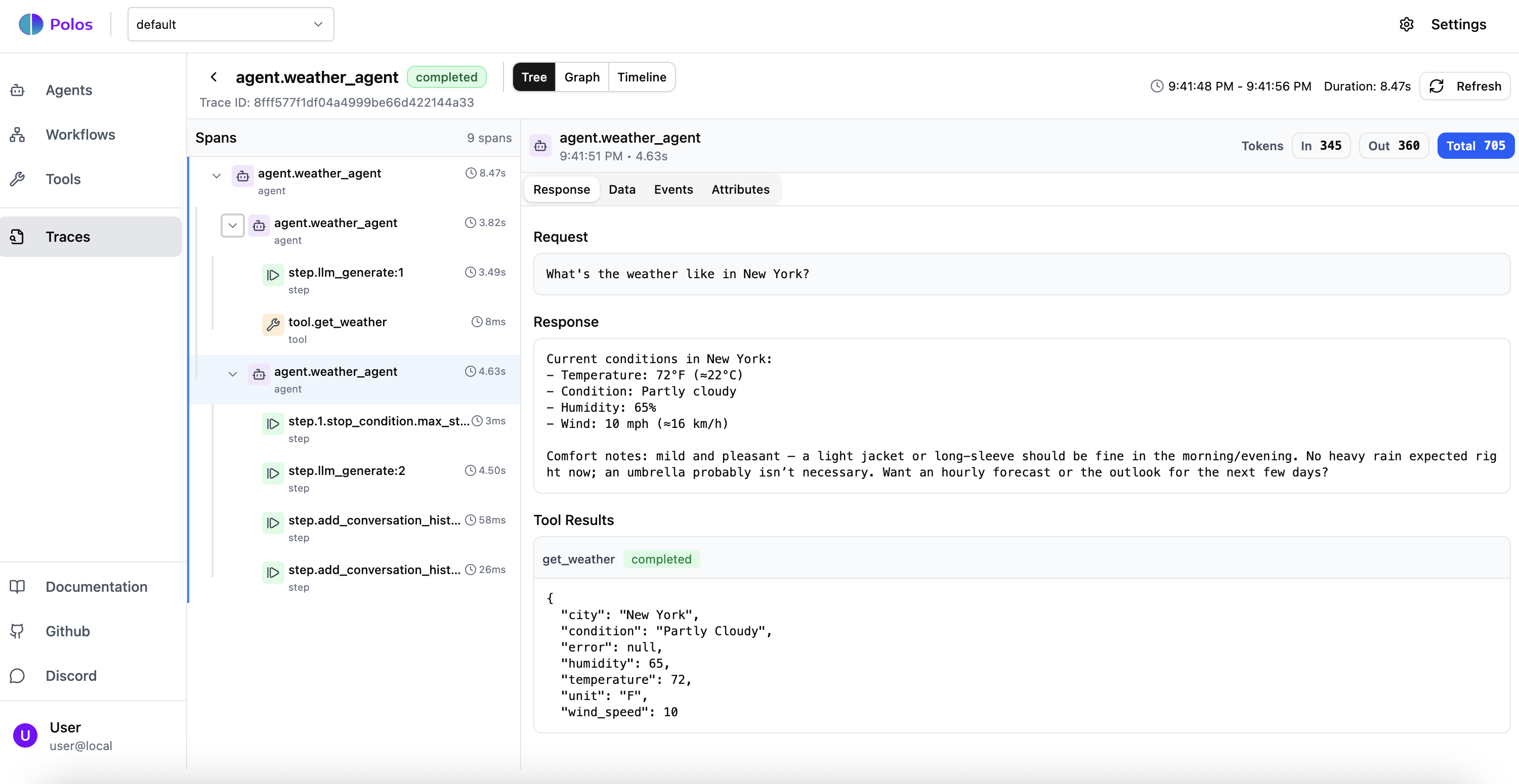
Open [http://localhost:5173](http://localhost:5173) to see your agent execution in the Polos dashboard. You can trace every step, see tool calls, and inspect the agent's reasoning.
 ## Understand the code
### Project structure
`create-polos` generates the following structure:
```text TypeScript theme={null}
my-project/
├── package.json
├── tsconfig.json
├── .env.example
├── src/
│ ├── main.ts # Worker entry point
│ ├── agents/
│ │ ├── coding-agent.ts # Coding agent with sandbox tools
│ │ └── assistant-agent.ts # General-purpose assistant
│ └── workflows/
│ └── text-review/
│ ├── agents.ts # Specialized review agents
│ └── workflow.ts # Multi-agent review workflow
```
```text Python theme={null}
my-project/
├── pyproject.toml
├── .env.example
├── src/
│ ├── main.py # Worker entry point
│ ├── agents/
│ │ ├── coding_agent.py # Coding agent with sandbox tools
│ │ └── assistant_agent.py # General-purpose assistant
│ └── workflows/
│ └── text_review/
│ ├── agents.py # Specialized review agents
│ └── workflow.py # Multi-agent review workflow
```
### Agent definition
The coding agent gets six built-in sandbox tools (`exec`, `read`, `write`, `edit`, `glob`, `grep`) via a single `sandboxTools()` call:
```typescript src/agents/coding-agent.ts theme={null}
import { anthropic } from '@ai-sdk/anthropic';
import { defineAgent, maxSteps, sandboxTools } from '@polos/sdk';
const tools = sandboxTools({
env: 'local',
});
export const codingAgent = defineAgent({
id: 'coding_agent',
model: anthropic('claude-sonnet-4-5'),
systemPrompt: 'You are a coding agent with access to sandbox tools. Use your tools to read, write, and execute code.',
tools,
stopConditions: [maxSteps({ count: 30 })],
});
```
```python src/agents/coding_agent.py theme={null}
from polos import (
Agent,
max_steps,
MaxStepsConfig,
sandbox_tools,
SandboxToolsConfig,
)
sandbox = sandbox_tools(
SandboxToolsConfig(
env="local",
)
)
coding_agent = Agent(
id="coding_agent",
provider="anthropic",
model="claude-sonnet-4-5",
system_prompt=(
"You are a coding agent with access to sandbox tools. "
"Use your tools to read, write, and execute code."
),
tools=[*sandbox],
stop_conditions=[max_steps(MaxStepsConfig(count=30))],
)
```
Key things to notice:
* **`env: "local"`** runs tools directly on the host - for container isolation in production, use `"docker"` instead (see [Sandbox Tools](/docs/guides/18-sandbox-tools))
* Exec security defaults to **`approval-always`** for local mode - every shell command suspends for your approval
* The agent gets six tools automatically: `exec`, `read`, `write`, `edit`, `glob`, `grep`
### Worker entry point
The worker registers agents and workflows with the orchestrator. `polos dev` runs this automatically.
```typescript src/main.ts theme={null}
import 'dotenv/config';
import { Polos } from '@polos/sdk';
// Import agents and workflows for registration
import './agents/coding-agent.js';
import './agents/assistant-agent.js';
import './workflows/text-review/agents.js';
import './workflows/text-review/workflow.js';
const polos = new Polos();
await polos.serve();
```
```python src/main.py theme={null}
import asyncio
from dotenv import load_dotenv
from polos import Polos
# Import agents and workflows for registration
import agents.coding_agent
import agents.assistant_agent
import workflows.text_review.agents
import workflows.text_review.workflow
load_dotenv()
async def main():
async with Polos() as polos:
await polos.serve()
if __name__ == "__main__":
asyncio.run(main())
```
## The Polos CLI
Once you're running, the CLI gives you full control:
```bash theme={null}
polos dev # Start server + worker with hot reload
polos run # Start an interactive session with an agent
polos agent list # List available agents
polos tool list # List available tools
polos logs # Stream logs from agent runs
```
## What just happened?
1. **`create-polos`** scaffolded a project with agents, a workflow, and configuration
2. **`polos dev`** started the orchestrator, connected your worker, and began watching for changes
3. **`polos run`** started an interactive session - the agent decided to write a file, and Polos **suspended** execution for your approval
4. You approved - Polos **resumed** execution exactly where it left off
5. The agent ran code in a **sandboxed environment** with built-in tools
6. Every step was **durably checkpointed** - if the process crashed mid-execution, it would resume from the last completed step without re-running the LLM calls you already paid for
This is Polos in action: **sandboxed execution**, **human-in-the-loop approval**, and **durable state** - all without writing retry logic, state machines, or approval infrastructure yourself.
## Next steps
Understand how Polos handles state and durability
Learn about tools, sandbox, streaming, and more
Orchestrate multi-step processes with human-in-the-loop
See more examples: HITL agents, multi-agent systems, and more
**Need help?** Join our [Discord community](https://discord.com/invite/ZAxHKMPwFG) for support and discussions.
## Understand the code
### Project structure
`create-polos` generates the following structure:
```text TypeScript theme={null}
my-project/
├── package.json
├── tsconfig.json
├── .env.example
├── src/
│ ├── main.ts # Worker entry point
│ ├── agents/
│ │ ├── coding-agent.ts # Coding agent with sandbox tools
│ │ └── assistant-agent.ts # General-purpose assistant
│ └── workflows/
│ └── text-review/
│ ├── agents.ts # Specialized review agents
│ └── workflow.ts # Multi-agent review workflow
```
```text Python theme={null}
my-project/
├── pyproject.toml
├── .env.example
├── src/
│ ├── main.py # Worker entry point
│ ├── agents/
│ │ ├── coding_agent.py # Coding agent with sandbox tools
│ │ └── assistant_agent.py # General-purpose assistant
│ └── workflows/
│ └── text_review/
│ ├── agents.py # Specialized review agents
│ └── workflow.py # Multi-agent review workflow
```
### Agent definition
The coding agent gets six built-in sandbox tools (`exec`, `read`, `write`, `edit`, `glob`, `grep`) via a single `sandboxTools()` call:
```typescript src/agents/coding-agent.ts theme={null}
import { anthropic } from '@ai-sdk/anthropic';
import { defineAgent, maxSteps, sandboxTools } from '@polos/sdk';
const tools = sandboxTools({
env: 'local',
});
export const codingAgent = defineAgent({
id: 'coding_agent',
model: anthropic('claude-sonnet-4-5'),
systemPrompt: 'You are a coding agent with access to sandbox tools. Use your tools to read, write, and execute code.',
tools,
stopConditions: [maxSteps({ count: 30 })],
});
```
```python src/agents/coding_agent.py theme={null}
from polos import (
Agent,
max_steps,
MaxStepsConfig,
sandbox_tools,
SandboxToolsConfig,
)
sandbox = sandbox_tools(
SandboxToolsConfig(
env="local",
)
)
coding_agent = Agent(
id="coding_agent",
provider="anthropic",
model="claude-sonnet-4-5",
system_prompt=(
"You are a coding agent with access to sandbox tools. "
"Use your tools to read, write, and execute code."
),
tools=[*sandbox],
stop_conditions=[max_steps(MaxStepsConfig(count=30))],
)
```
Key things to notice:
* **`env: "local"`** runs tools directly on the host - for container isolation in production, use `"docker"` instead (see [Sandbox Tools](/docs/guides/18-sandbox-tools))
* Exec security defaults to **`approval-always`** for local mode - every shell command suspends for your approval
* The agent gets six tools automatically: `exec`, `read`, `write`, `edit`, `glob`, `grep`
### Worker entry point
The worker registers agents and workflows with the orchestrator. `polos dev` runs this automatically.
```typescript src/main.ts theme={null}
import 'dotenv/config';
import { Polos } from '@polos/sdk';
// Import agents and workflows for registration
import './agents/coding-agent.js';
import './agents/assistant-agent.js';
import './workflows/text-review/agents.js';
import './workflows/text-review/workflow.js';
const polos = new Polos();
await polos.serve();
```
```python src/main.py theme={null}
import asyncio
from dotenv import load_dotenv
from polos import Polos
# Import agents and workflows for registration
import agents.coding_agent
import agents.assistant_agent
import workflows.text_review.agents
import workflows.text_review.workflow
load_dotenv()
async def main():
async with Polos() as polos:
await polos.serve()
if __name__ == "__main__":
asyncio.run(main())
```
## The Polos CLI
Once you're running, the CLI gives you full control:
```bash theme={null}
polos dev # Start server + worker with hot reload
polos run # Start an interactive session with an agent
polos agent list # List available agents
polos tool list # List available tools
polos logs # Stream logs from agent runs
```
## What just happened?
1. **`create-polos`** scaffolded a project with agents, a workflow, and configuration
2. **`polos dev`** started the orchestrator, connected your worker, and began watching for changes
3. **`polos run`** started an interactive session - the agent decided to write a file, and Polos **suspended** execution for your approval
4. You approved - Polos **resumed** execution exactly where it left off
5. The agent ran code in a **sandboxed environment** with built-in tools
6. Every step was **durably checkpointed** - if the process crashed mid-execution, it would resume from the last completed step without re-running the LLM calls you already paid for
This is Polos in action: **sandboxed execution**, **human-in-the-loop approval**, and **durable state** - all without writing retry logic, state machines, or approval infrastructure yourself.
## Next steps
Understand how Polos handles state and durability
Learn about tools, sandbox, streaming, and more
Orchestrate multi-step processes with human-in-the-loop
See more examples: HITL agents, multi-agent systems, and more
**Need help?** Join our [Discord community](https://discord.com/invite/ZAxHKMPwFG) for support and discussions.